Living off grid gives you the freedom to choose where you stay. Starlink can bring high-speed broadband to a campervan, motorhome or remote place to live without a fixed phone line, fibre connection or nearby mobile mast. With suitable power, an active service and a clear view of the sky, you can take your internet connection with you.
That means more choice about where you stay, fewer evenings wrestling with campsite Wi-Fi and a practical way to keep everyday life connected. Here is how off-grid internet with Starlink can fit into life on the road.
The essentials: no wired broadband connection is needed. You still need electricity, open sky and a service plan that permits your location and use. For travel between pitches, start by comparing Starlink Roam.
Choose the view, then bring the broadband
Picture a quiet rural pitch: breakfast outside the van, a walk planned for the afternoon and a laptop ready when you need it. A phone hotspot might be all you need in some places. In others, a weak mobile signal can dictate where you park or how long you stay.
Starlink gives you another option. The dish connects through satellites rather than the local phone network, so a lack of usable 4G or 5G does not automatically mean a lack of internet. It is particularly appealing if you enjoy remote stops, spend long periods in a motorhome or want an internet connection that travels with your plans.
Compare both approaches in our Starlink versus 5G guide for motorhomes, caravans and vans.
What better internet makes possible off grid
- Stay close to people: video-call family, share photographs and catch up with friends from your next stop.
- Make daily admin easier: manage online banking, book your next campsite, check the weather and download route information before setting off.
- Enjoy evenings in: stream a film, listen to music or catch up on your favourite programmes without depending entirely on shared campsite Wi-Fi.
- Keep devices connected: give phones, tablets and laptops a familiar Wi-Fi network rather than repeatedly setting up individual hotspots.
- Support time away: access email, cloud files and video meetings where the connection and service terms suit your work. For a trading van or business operation, see our Starlink guide for mobile businesses and touring crews.
Performance varies with the location, sky view, network demand and chosen plan. Think of Starlink as a useful way to widen your options; test the connection before relying on it for an important call.
Skip the wait for a new broadband installation
A new fixed broadband connection can involve an engineer visit, work to the property and a wait of weeks before service goes live. That can be frustrating at a remote address—and a fixed line cannot simply follow your motorhome to the next destination.
A basic portable Starlink setup normally needs no engineer appointment. Order a suitable kit and service, have it delivered, find an open position and follow the app. Starlink says a standard Mini setup can take as little as 15 minutes, depending on the mounting and power arrangement.
Delivery and setup are separate: Starlink’s current UK guidance lists 2–4 days for delivery after dispatch. Check the shipping estimate for your actual order, as stock and dispatch times vary. Once it arrives, a straightforward setup can get you online quickly; account activation, software updates or an obstructed position can add time.
Our Starlink Mini setup guide walks through placement, power, Wi-Fi and the app.
Why Starlink Mini suits life in a van
Space matters when your home travels with you. Mini combines the satellite terminal and Wi-Fi router in one compact kit, making it an attractive starting point for a portable setup. You can pack it away for travel and put it in a suitable position when you stop.
A position with good satellite visibility may be outside the vehicle. Check that Wi-Fi reaches the seat or table where you actually use your laptop: a metal van body can affect the local wireless signal. A suitable indoor networking arrangement may help where needed.
Before buying, separate the two choices: Mini or Standard describes the hardware; Roam or Residential describes the service. Compare travel plans for a moving lifestyle and fixed-address service for a permanent home, using the options offered for your location and kit.
Off grid still needs a power plan
Your internet can be independent of a wired broadband connection while running from your own energy supply. A suitably designed leisure-battery system or compatible portable power station can make that possible. Solar charging can replenish the battery, but the complete system needs to cover your daily use.
Starlink’s current support guidance puts Mini’s average consumption at 20–40 watts, with actual demand varying. At an assumed 30 watts, eight hours of use consumes about 240 watt-hours before any additional conversion losses. Add that to the lighting, fridge and other loads when planning your usable battery capacity.
Use power accessories specified for your kit. For USB-C operation, Starlink recommends a suitable 100W USB Power Delivery source and its compatible cable; an ordinary phone charger is not an equivalent supply. For days on a serviced pitch, our motorhome and caravan hookup lead guide covers the campsite connection.
If a portable generator forms part of your off-grid charging setup, its earthing and protection arrangements need to suit the complete installation. Our floating-neutral generator and neutral–earth bonding guide explains why a bonding plug is not a universal solution.
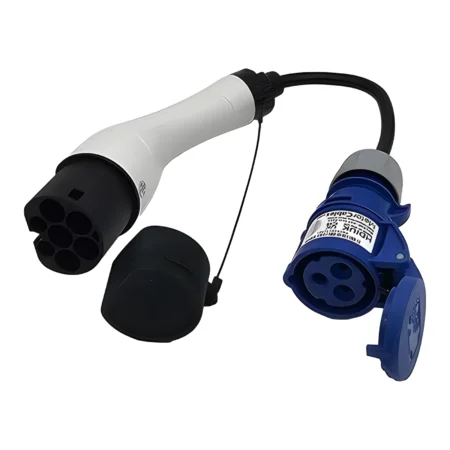
For another charging option while travelling, read our guide to recharging phones, laptops, e-bikes and mobility scooters from a compatible EV charge point. It explains the converter required and why you must confirm the charge point and operator permit the use.
For a permanent roof installation or a battery-powered setup, read our guide to powering Starlink Mini from a leisure battery, car battery or solar-charged system. It covers the DC supply, cable route and usable battery runtime.
Monthly flexibility: keep your Roam kit between trips
When you buy your Roam equipment, the kit is yours. You keep it when you pause or cancel the service, ready for a future trip. Buying the dish and paying for the internet subscription are separate things.
Starlink offers a month-to-month service option, so you can choose monthly flexibility rather than committing to a long fixed term. Cancel before the next invoice is generated to avoid the next recurring charge; the connection continues until the date you have paid for. Check your selected offer for any service commitment or associated change fee.
For gaps between journeys, eligible Roam services offer paid Standby Mode. This keeps limited low-speed connectivity for a smaller ongoing charge rather than a full high-speed subscription. Read our guide to pausing Starlink Roam and restarting for the practical details.
Rented equipment is different: Starlink normally requires it back within 30 days of cancellation, using its return instructions. That is separate from keeping a Roam kit you purchased. Cancellation also does not guarantee immediate reactivation later, as availability and capacity can change.
A simple checklist before your next adventure
- Check your destinations: confirm coverage and the service rules for the places you intend to stay.
- Choose your kit and plan: account for portability, data use, power and whether you move between locations.
- Try it before leaving: download the app, check your account and practise a complete setup.
- Find open sky at each stop: use the app’s obstruction check; trees, buildings and awnings can interrupt service.
- Make the pitch practical: secure the equipment, protect connections and keep cables out of walkways. Stow portable kit before driving; in-motion use needs explicitly supported hardware, mounting and service.
Get £40 cash or Starlink service credit
Ready to bring broadband to your off-grid life? Check Starlink availability and the current offer through our referral link. Eligible UK new customers can receive £40 cash or Starlink service credit, subject to Starlink’s terms.
Referral disclosure: we may receive a reward when you join through our link. The new customer must order directly through the referral link, activate and remain subscribed for two full monthly billing cycles to qualify. Reward options, verification and eligibility depend on Starlink’s current conditions; check the offer shown for your country and chosen plan before ordering. Retail purchases and account transfers do not qualify under the stated referral rules.
Off-grid Starlink FAQs
Can I use Starlink off grid without mains electricity?
Yes, with a suitable independent power supply. Starlink does not need a fixed broadband line or mobile signal, but the dish and Wi-Fi equipment still need electricity. Size your battery, charging system and compatible power accessories for the kit and hours of use.
Is Starlink suitable for van life and motorhomes?
Starlink can provide broadband for vans and motorhomes at permitted locations with a clear sky view and suitable power. Choose a travel service such as Roam for moving between destinations and check the current coverage and plan conditions.
How quickly can I get Starlink working?
Starlink says a standard Mini setup can take as little as 15 minutes. Account readiness, updates, obstructions and your installation can add time. UK delivery guidance currently lists 2–4 days after dispatch; the order-specific shipping estimate is separate.
Do I need an engineer to install Starlink?
A basic portable setup is designed for self-installation, so it normally does not require an engineer appointment. A permanent roof mount, cable entry or changes to a vehicle electrical system may need a competent installer.
Do I return my Roam dish when I pause or cancel?
If you bought your Roam kit, it remains yours when you pause or cancel service. Paid Standby Mode can suit gaps between trips. Rental kits have separate return requirements, normally within 30 days of cancellation; follow the deadline in your account.
Is Starlink a monthly rolling contract?
Starlink offers a month-to-month service option. Cancel before the next invoice is generated to stop the next recurring charge; service continues to the date already paid for. Check the selected offer for any service commitment or change fee.
Keep exploring our Starlink series
- Starlink or 5G? Choosing internet for motorhomes and vans
- Starlink Mini: from unboxing to Wi-Fi
- Pausing Starlink Roam: Standby Mode and restarting
- Starlink Wi-Fi for coffee vans, catering trailers and touring crews
Service information checked on 12 November 2026 against Starlink’s published setup, UK delivery, power, contract, return and referral guidance. Plans and offers can change.