A public EV charge point may offer a useful place to recharge more than a car. With a suitable converter, a compatible Type 2 AC socket and the operator’s permission, you can use your normal mains charger to recharge a laptop, mobile phone, e-bike, electric scooter or mobility scooter.
For an e-bike commuter, a planned day out on a mobility scooter or someone working away from home, having another permitted charging option can make a stop more useful. The key is choosing the right connection and checking the location before you depend on it.
Start with these three checks: a compatible socketed Type 2 AC charge point, permission for auxiliary-power use, and a device charger suitable for the converter’s 230V mains output. This is not a universal feature of public EV chargers.
Need a CEE hookup outlet or a TRUE1 connection instead of a three-pin mains socket? See the 16A auxiliary power adaptor guide for those connection options.
The converter that makes the connection
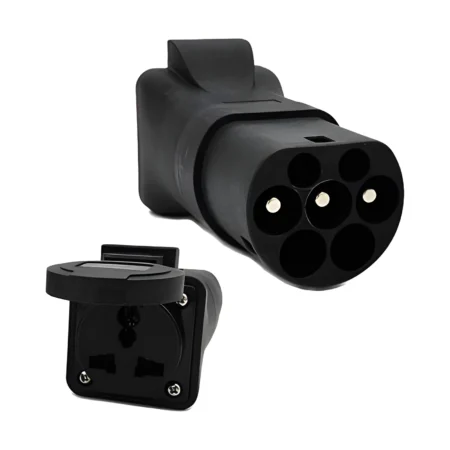
Our EV Type 2 plug to 13A Type G / universal socket converter provides a mains socket from a compatible Type 2 AC charge point. Your usual charger plugs into that socket and charges your device in the normal way.
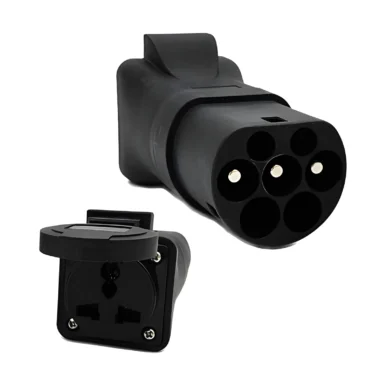
View the Type 2 to Type G socket converter →
The converter is the link between the charge point and your charger. It does not replace a phone’s USB power adapter, a laptop power supply or an e-bike’s dedicated battery charger. The socket’s universal format also does not convert voltage: check the charger’s input label for suitability for UK 230V AC.
Five useful ways to use an authorised charging stop
| Device | What you connect | A practical use case |
|---|---|---|
| Mobile phone or tablet | Its suitable mains USB charger and charging cable. | Replenish the battery for calls, navigation and travel information during a planned stop. |
| Laptop | The appropriate laptop power supply or USB-C PD charger. | Recharge between visits or while working at a venue with a permitted charging arrangement. |
| E-bike | The charger specified for the bike or removable battery. | Arrange a top-up at work or a destination before the return journey. |
| Electric scooter | The charger approved for that exact battery and scooter. | Make use of an agreed charging facility rather than searching for an ordinary socket. |
| Mobility scooter | The manufacturer’s suitable mains battery charger. | Plan an accessible charging stop at a venue that has confirmed permission and compatibility. |
These are potential applications, rather than a list of tested networks or guaranteed charging locations. For a mobility scooter, agree an accessible position in advance and check that you can reach the charge point and manage the connection comfortably.
Which public EV charge points can you use?
Look for a socketed Type 2 AC outlet that is confirmed compatible with this converter. The presence of an EV symbol or a high power rating is not enough. A unit with an attached vehicle lead is a different connection arrangement, and CCS or CHAdeMO rapid DC connectors are not suitable for this product.
Check the exact charge-point model and the operator’s rules before buying for a particular location. Some networks prohibit this type of adapter. For example, Pod Point states that Type 2-to-three-pin adapters are not permitted on its public network.
Other locations need their own confirmation. If you already have access to a suitable charge point at work, at home or at a destination, ask about the intended auxiliary-power use and follow the equipment instructions. Technical compatibility and permission are separate checks.
Follow parking conditions, access restrictions and normal charging-session requirements. An adapter does not make electricity free, reserve a bay for another purpose or remove the need to pay.
How to recharge a phone or laptop
- Confirm the location first. Establish the charge point’s compatibility, the operator’s permission, any required electrical protection and the tariff or parking conditions.
- Bring the right charging equipment. Pack the converter plus your device’s suitable mains charger and cable. Check the input voltage and the condition of all connectors.
- Choose a suitable position. The compact universal converter used in this walkthrough should not be used in the rain. Outdoor-enclosure models have their own marked ratings and sealing requirements; keep the connected charger and device dry and use every part within its instructions. Support the equipment and keep it clear of vehicle movements or walkways.
- Follow the connection and session instructions. Use the sequence specified for the adapter and charge point. Where required, authorise the session through the operator’s normal app, card or payment process.
- Check the device is actually charging. Look for its charging indication and remain with the equipment. A connected Type 2 plug alone does not confirm that the mains outlet is energised.
- Finish through the normal controls. Stop the session, confirm it has ended and follow the equipment’s release and disconnection instructions. Never force a locked connector; ask the operator for help if it will not release.
A laptop still needs an adequate power supply and a suitable charging cable. Apple, for example, recommends a USB-C Power Delivery adapter with appropriate wattage for the Mac model. The same principle applies when selecting the correct charger for another laptop.
E-bikes, scooters and mobility scooters
The attractive part of this use case is familiarity: you keep using the battery charger designed for your equipment. The converter supplies its mains input; the charger manages the battery’s charging requirements.
For an e-bike commuter, that could mean an agreed top-up at a workplace charge point before heading home. For a mobility scooter user, it could mean a pre-arranged charging stop at a destination. Check the facilities, the time available and your manufacturer’s charging instructions when planning the journey.
Use the original or manufacturer-recommended charger. London Fire Brigade advises allowing e-bike and e-scooter batteries to cool after use, charging on a hard, flat surface away from escape routes, and never leaving a battery charging unattended. Stop using damaged batteries or chargers and follow the manufacturer’s advice.
Different batteries and chargers have different charging times. Do not assume a short stop will restore enough range for the rest of a journey, and do not connect a battery directly to the converter’s mains outlet.
Does an EV charge point make charging faster or cheaper?
Your usual charger and device determine the charging rate. A 7kW or 22kW label on a charge point describes its maximum capability, not the amount it pushes into your phone. A higher-rated charge point does not turn an ordinary e-bike charger into a rapid charger.
Compare the full cost of the stop. Energy may be billed per kWh, but connection fees, minimum charges, time-based fees and parking can matter more for a small load. Check the current tariff and end the session promptly when finished.
This product is most useful when it opens up an appropriate, permitted charging option that fits your plans. For everyday phone charging, a charged power bank may still be the more convenient choice.
Choose your Type 2 to 230V adapter
There are several ways to obtain a suitable mains outlet from a compatible Type 2 AC charge point. Choose the outlet format, connection arrangement and environmental protection for your equipment. The compact universal converter used in this walkthrough is one option in the range.
| Converter | When to consider it | What to check |
|---|---|---|
| Type 2 to Type G / universal socket converter | A compact mains-socket option for an appropriate phone, laptop or battery charger. | Use the compatible socketed Type 2 AC arrangement specified for this model. Keep it dry; it should not be used in the rain. |
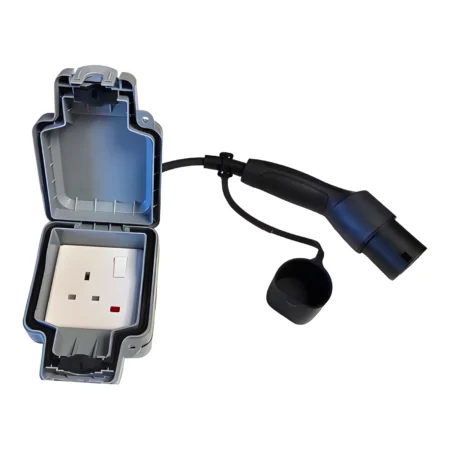
| Type 2 to 13A IP66 outdoor power converter | A single UK socket in an IP66-rated outdoor enclosure, with switched and unswitched options. | Follow the enclosure and cable-sealing instructions. Its socket-enclosure rating does not make the plugged-in charger or device weatherproof. |
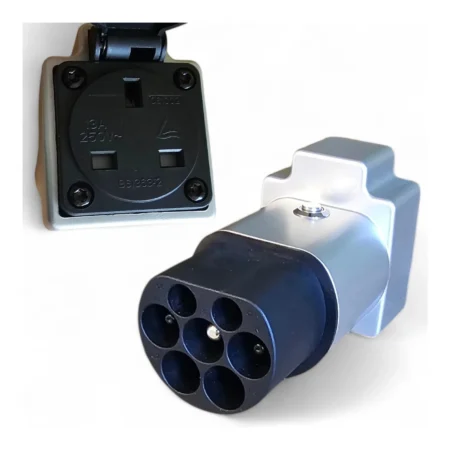
| Type 2 power outlet converter: UK plug version | A dedicated UK Type G outlet for a suitable 230V charger or appliance. | The listing specifies dry-condition use. Match the exact connection arrangement and stay within the marked rating. |
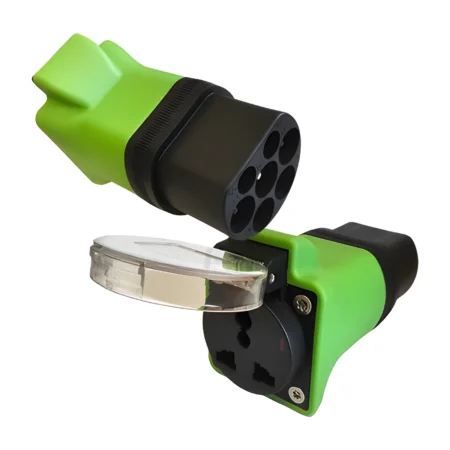
| Type 2 EV plug adapter for e-bike / scooter recharge | A compact universal-outlet alternative whose listing covers compatible tethered or detachable Type 2 AC charging leads. | Confirm the exact lead and charge-point configuration. This adapter must be kept dry; another weather-resistant lead does not waterproof it. |
For other outlet formats, we also offer a Type 2 to Schuko adapter and a Type 2 to blue CEE 16A, 230V converter. A UK three-pin charger does not plug directly into a blue CEE outlet; choose the correct connection equipment for the complete setup. All options remain subject to charge-point compatibility, equipment ratings and the operator’s permission.
Choose the converter for your setup
Need a mains socket from a compatible Type 2 AC charge point? Explore the MotorCables Type 2 to Type G / universal socket converter, check the product details and confirm the charger and location before ordering.
Explore the single IP66 outdoor socket option →
If you need a different outlet, browse our Type 2 socket converter range. Our EV adapter applications guide explains the different jobs these products perform, and our CP and PP guide explains the charge-point signalling in plain English.
Planning power and connectivity away from home? Continue with living off grid with Starlink and our motorhome and caravan hookup guide.
Frequently asked questions
Can I charge my mobile phone from a public EV charge point?
Potentially, using a purpose-designed converter at a compatible Type 2 AC socket where the operator permits this use. Plug your normal, suitable mains phone charger into the converter. This is not supported by every charge point or network.
Can I plug a laptop directly into a Type 2 charger?
A laptop cannot connect directly to a Type 2 EV socket. The converter provides a mains outlet for your laptop’s suitable power adapter; that adapter then supplies the laptop through its normal charging connection.
Can I charge an e-bike, electric scooter or mobility scooter this way?
Where the charge point is compatible and the operator permits it, the converter can supply the device’s appropriate mains battery charger. Use the charger specified by the device or battery manufacturer. Never connect mains power directly to a battery.
Will a 22kW charge point charge my phone or e-bike faster?
The charge point’s maximum rating does not set your device’s charging speed. Your normal charger and the device’s battery management determine the charging rate, within the available supply and equipment limits.
Does this work with rapid DC chargers or tethered EV cables?
The compact universal converter used in this walkthrough is described for a compatible socketed Type 2 AC charge point. Other products in the comparison cover specified tethered or detachable AC leads. Match the exact adapter and connection; none of these is for CCS or CHAdeMO rapid DC charging, and do not assume Tesla Supercharger compatibility.
Can I use this converter in the rain?
The compact Type G / universal converter used in this walkthrough should not be used in the rain. The range also includes an IP66 outdoor socket-enclosure model. Follow the exact product’s rating and sealing instructions, and remember that an outdoor socket enclosure does not make a phone, laptop or battery charger weatherproof.
Can I use it on the Pod Point public network?
Pod Point publishes a restriction on Type 2-to-three-pin adapters on its public network. Do not use this converter there contrary to that restriction. For other charge points, confirm the operator’s permission and compatibility before relying on them.
Sources and product information
- MotorCables: the exact converter, socket format and dry-use limitation.
- Pod Point: published public-network adapter restriction.
- London Fire Brigade: charging e-bikes and e-scooters safely.
- Apple: choosing an appropriate laptop power adapter.
- Pride Mobility: using the charger matched to your scooter battery.
Information checked on 12 November 2026. Confirm the current product instructions, charger compatibility, operator policy and site conditions for the intended use.